1 flask-cookie-decode

|
1.1 Purpose
Adds a cookie command to the built-in Flask CLI which will provide various
tools for debugging the secure session cookie that Flask uses by default.
1.1.1 Current available commands
flask cookie decode: decodes and verifies the signature of the session cookie
1.2 Background
By default the Flask session uses a signed cookie to store its data. The Flask
application signs the cookie using its SECRET_KEY. This provides the Flask
application a way to detect any tampering to the session data. If the application
is indeed using a secret key and secure hashing algorithm, the session signature
will be unique to application.
For more on the topic of the Flask session see these references:
1.2.1 Disclaimer: Keep your SECRET_KEY, secret!
If you expose this key your application becomes vulnerable to session replay
attacks. Here is an example where an application exposed the SECRET_KEY
during 404 errors. The example also illustrates how session replay works.
By default Flask does not expose the SECRET_KEY anywhere. It is up to you
the developer to keep it that way!
1.3 Usage
1.3.1 Installation
$ pip install flask-cookie-decode
1.3.2 Extracting the cookie using browser tools
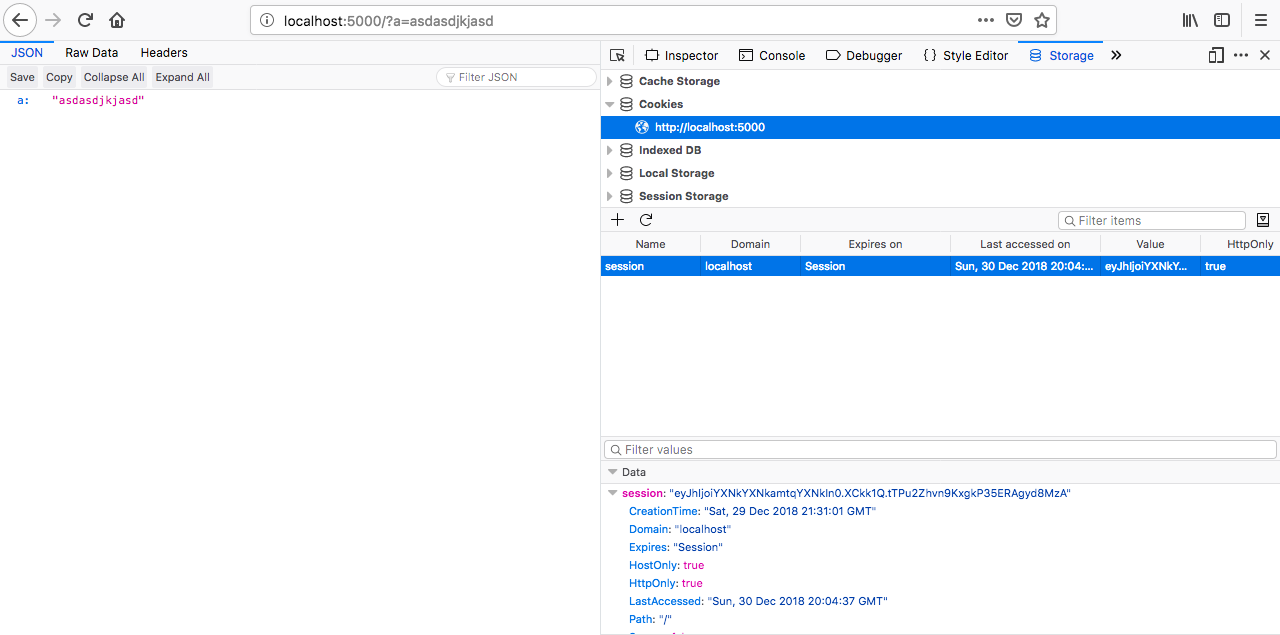
1.3.3 Example Flask app
See examples/app.py:
from flask import Flask, jsonify, session, request
from flask_cookie_decode import CookieDecode

app = Flask(__name__)
app.config.update({'SECRET_KEY': 'jlghasdghasdhgahsdg'})
cookie = CookieDecode()
cookie.init_app(app)

@app.route('/')
def index():
    a = request.args.get('a')
    session['a'] = a
    return jsonify(dict(session))
1.3.4 Examples using the CLI:
This extension will ship two CLI interfaces for dealing with decoding cookies. One requires a Flask application instance for the application you are wanting to debug. This method has the added benefit that the signature of the cookie can be verified, as your application instance has the SECRET_KEY used to sign the cookie. This method returns decoded cookie objects which can be seen in the examples below. This method can return a few different types of cookie objects depending on the state of the cookie. Please keep in mind that this extension provides only a thin-wrapper around the logic Flask uses to deal with cookies.
The second CLI interface is a tool for decoding cookies without the app secret. It cannot validate the signatures on the cookies or check the expirations and does not require the application instance like the other CLI. Intended for debugging purposes only.
1.3.4.1 CLI attached to application instance
A cookie with a valid signature:
$ export FLASK_APP=app.py
$ flask cookie decode eyJhIjoiYXNkYXNkamtqYXNkIn0.XCkk1Q.tTPu2Zhvn9KxgkP35ERAgyd8MzA
TrustedCookie(contents={'a': 'asdasdjkjasd'}, expiration='2019-01-30T20:04:37')
A cookie with an invalid signature:
$ export FLASK_APP=app.py
$ flask cookie decode eyJhIjoiYXNkYXNkamtqYXNkIn0.XCkk1Q.tTPu2Zhvn9KxgkP35ERAgyd8MzA
UntrustedCookie(contents={'a': 'asdasdjkjasd'}, expiration='2019-01-30T20:04:37')
An expired cookie:
$ export FLASK_APP=app.py
$ flask cookie decode eyJhIjoiYXNkYXNkamtqYXNkIn0.XCkk1Q.tTPu2Zhvn9KxgkP35ERAgyd8MzA
ExpiredCookie(contents={'a': 'asdasdjkjasd'}, expiration='2019-01-30T20:04:37')
1.3.4.2 CLI that ships with package which only decodes
$ fcd decode eyJhIjoiYXNkYXNkamtqYXNkIn0
{
  "a": "asdasdjkjasd"
}
1.4 Documentation
1.5 License
MIT.